
How UK businesses can claim a ChatGPT business profile, verify it, and use Business Hub mentions, clicks and discovery topics to grow AI search visibility.
For the last two years, the honest answer to "how often does ChatGPT mention us?" has been "we can estimate it". On 10 November 2026 that changed. OpenAI opened Businesses in ChatGPT in beta, and through a new dashboard called Business Hub a business can now claim its profile, keep its details up to date and see 28 days of ChatGPT mentions, website clicks and the topics people were asking about when it was cited.
It is open wherever ChatGPT is available, so UK online businesses can use it today. We claimed clear-click.com in the first week and took screenshots at every step. This guide walks through how to get your business on ChatGPT, who it is for, what the data does and does not tell you, and how to use it to improve your position in AI search, organic and paid.
Three things worth knowing
- Claiming is free. It took us about 20 minutes plus review time, and for most UK businesses it runs through a website domain check and a government ID check.
- The insights are first-party data from ChatGPT itself: mentions, profile views, website clicks and discovery topics over the past 28 days. Small sites may see blanks until they clear a reporting threshold.
- Claiming does not buy you visibility. OpenAI says ChatGPT still makes its own recommendations. The value is control of your facts and a measurement layer you did not have before.
What is ChatGPT Business Hub?
Businesses in ChatGPT is the umbrella name for the programme. Business Hub is the dashboard inside it, reached from the ChatGPT sidebar or at chatgpt.com/business-hub. OpenAI describes three jobs for it: claim your business, manage your information, and see insights on how people engage with you in ChatGPT. The announcement frames this around reach, citing 1.2 billion weekly ChatGPT users.
There is a second part, Business Agents, which lets people start a labelled conversation with a business inside ChatGPT. At launch, publishing an agent is limited to eligible ecommerce and online service businesses in the US. You will see an Agent builder option in the sidebar from the UK, but for now the profile and the insights are the parts that matter here.
The easiest comparison is Google. Business Hub is part Google Business Profile, because you control the facts ChatGPT holds about you, and part Search Console, because you see platform data on how often you appear and how often people click through. BrightLocal described it in much the same terms.
Who should claim a ChatGPT business profile?
OpenAI says any eligible business located where ChatGPT is available can claim its business through Business Hub. In practice, for UK businesses at launch, that breaks down like this.
| Type of UK business | Can it claim a profile now? | Notes |
|---|---|---|
| Ecommerce brand with its own website | Yes | Can also add a product feed. Shopify stores can verify through a Shopify connection. |
| B2B or professional services firm | Yes | Claims through the website route. This is how we set up Clear Click. |
| Online-only business | Yes | Unlike Google Business Profile, online-only businesses are accepted. |
| Shop, restaurant or other walk-in location | Not yet | Claiming an existing local listing is US only at launch. Choosing a physical location led to a waitlist in Search Engine Journal's test. |
| Multi-brand or multi-location group | Yes, one by one | There is no parent account. Each brand or location is claimed and managed separately. |
Our view on who should prioritise it: any UK business that already gets enquiries or sales from organic search, and any business in a category where buyers ask ChatGPT for shortlists. Professional services, B2B suppliers, software, ecommerce and travel all fit. If your customers compare options before they buy, they are increasingly doing part of that comparison in ChatGPT.
There is also a defensive reason. The profile exists as a listing whether you manage it or not, and claiming it first means the person who controls your facts is you.
How to get your business on ChatGPT: step by step
These are the steps we followed for clear-click.com on 13 November 2026, with our own screenshots. The flow is in beta, so labels may shift, but the order has held steady in the walkthroughs published since launch, including Search Engine Journal's account of submitting its own site.
Before you start, have three things ready: access to your domain's DNS settings (or the person who manages them), a government-issued photo ID for whoever is claiming, and your business details exactly as they appear on Companies House.
1. Open Business Hub and search for your business
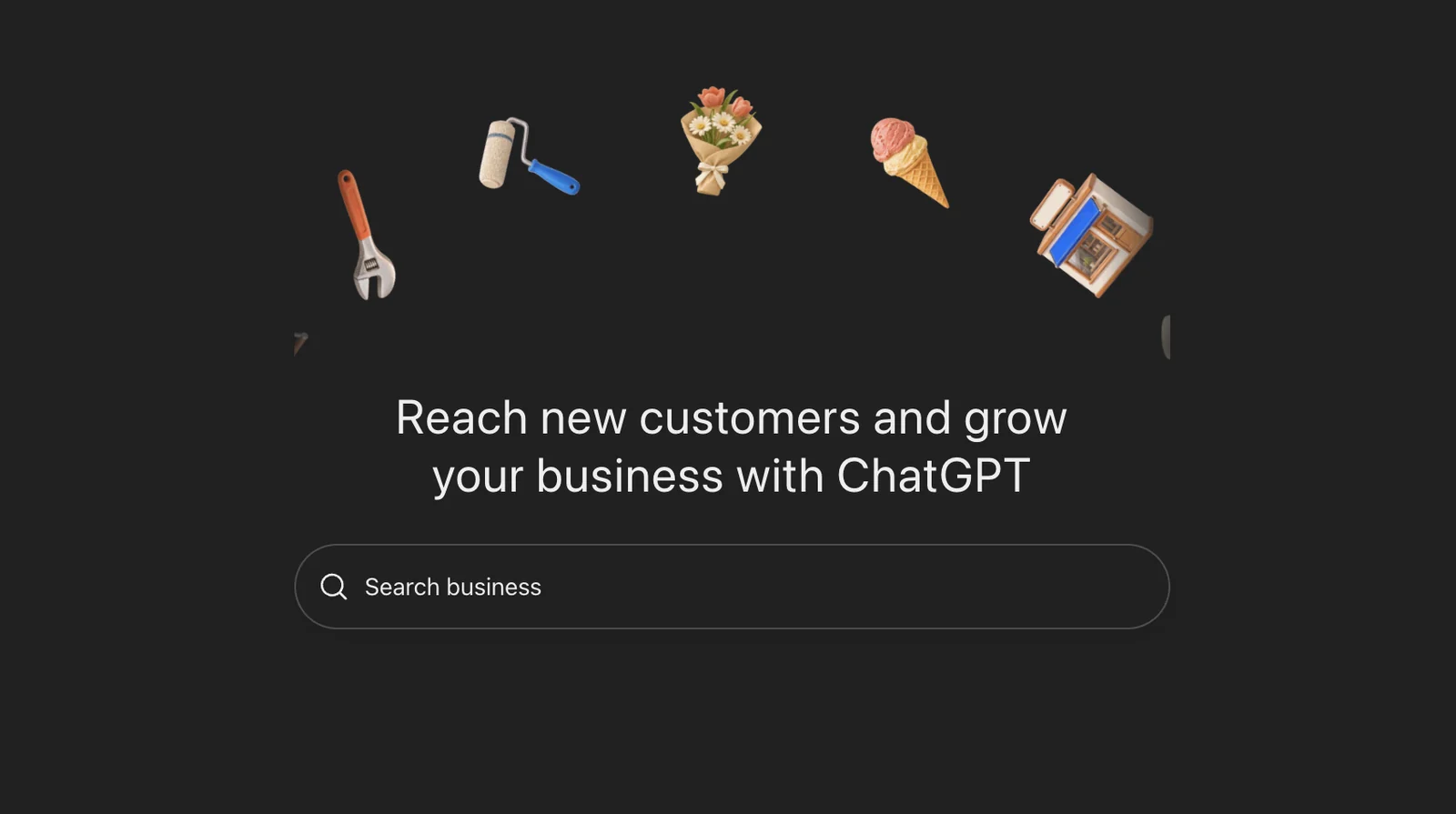
Sign in to ChatGPT with the account you use for work, open Business Hub from the sidebar and search for your business by name. If a listing appears, select it. If not, eligible online businesses will see an option to add a new one.
2. Start the claim
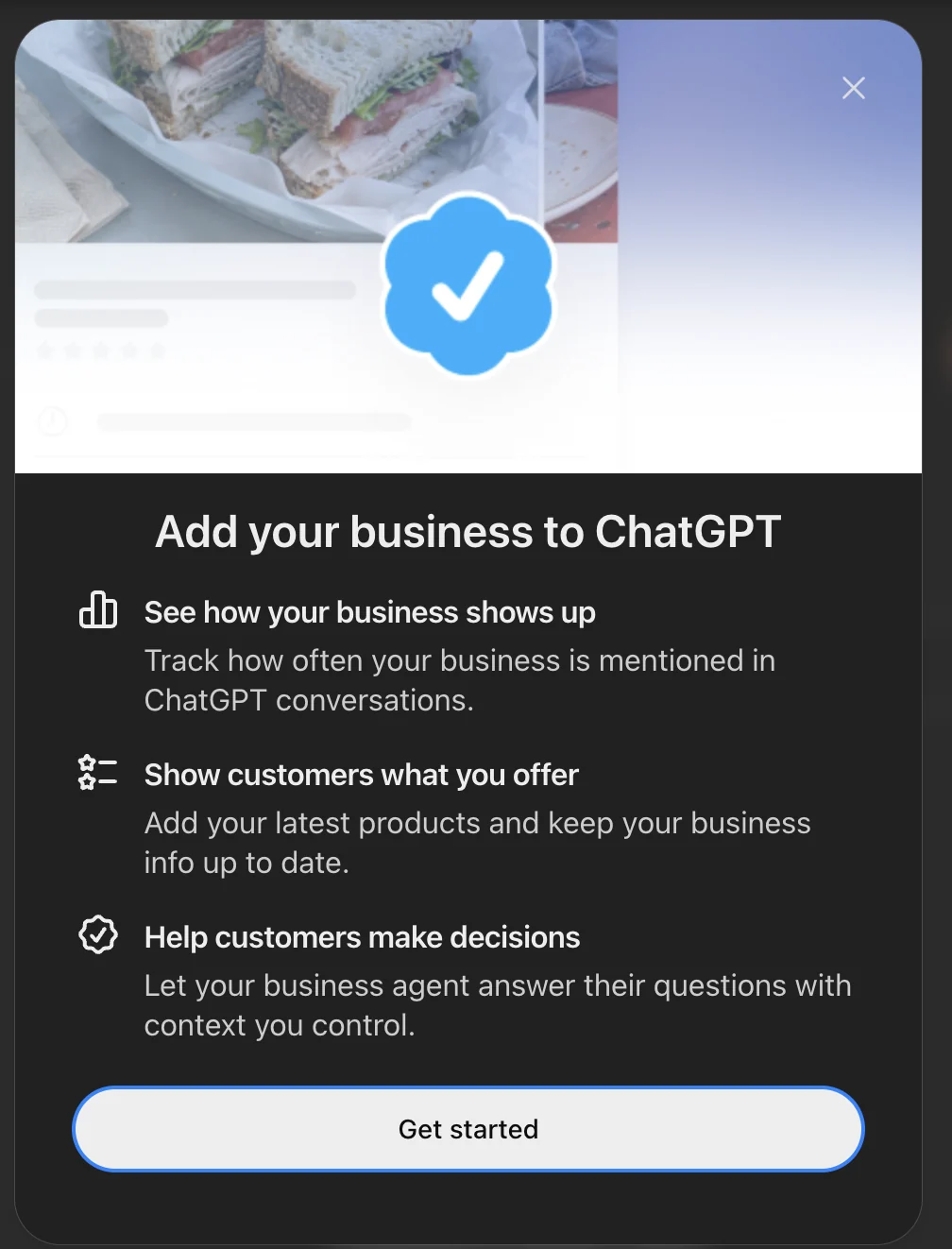
ChatGPT shows a short summary of what you get: a way to see how your business shows up, a place to add products and keep your details current, and, where eligible, a business agent. Select Get started.
3. Choose how customers interact with you
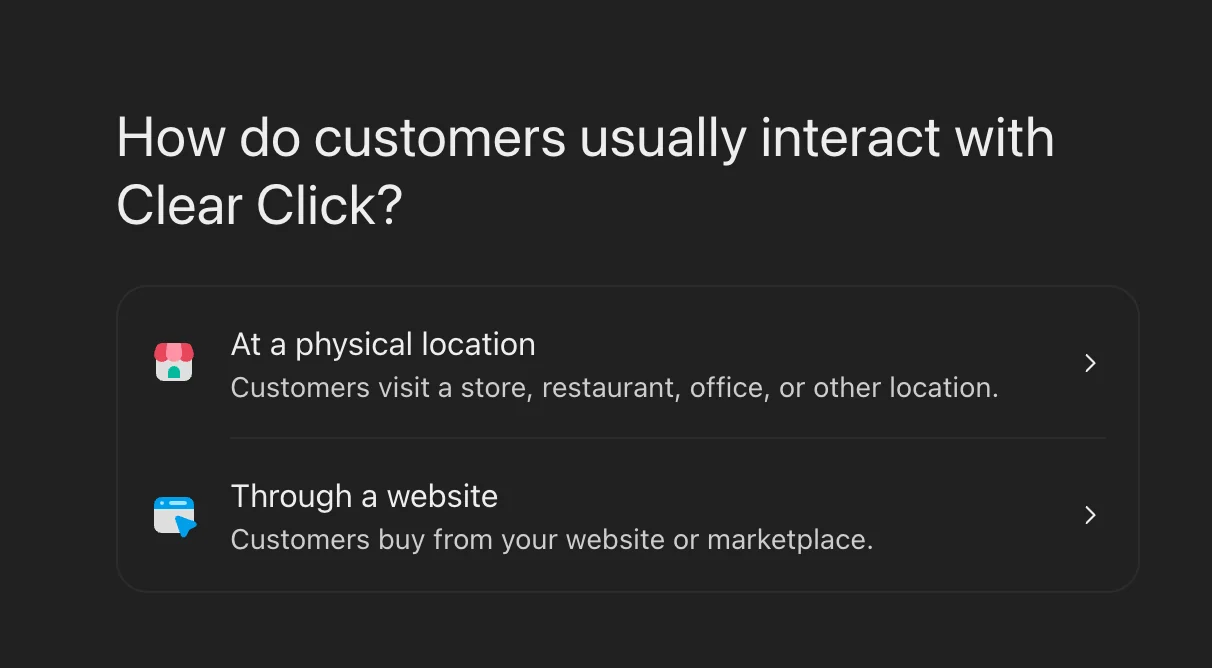
You are asked whether customers usually reach you at a physical location or through a website. For a UK business today, choose Through a website. The physical location route is built around existing US local listings, and in Search Engine Journal's test it led to a waitlist.
4. Verify that you control your domain
Business Hub gives you a TXT record to add to your domain's DNS. The record has a type (TXT), a name or host (openai-business-profile) and a unique value. Add it through your domain registrar or DNS provider, wait for it to take effect, then return to ChatGPT and select Verify domain.
Two practical points. The record has an expiry time shown on screen, so add it the same day. And if an IT team or web developer manages your DNS, send them the three values before you start rather than halfway through.
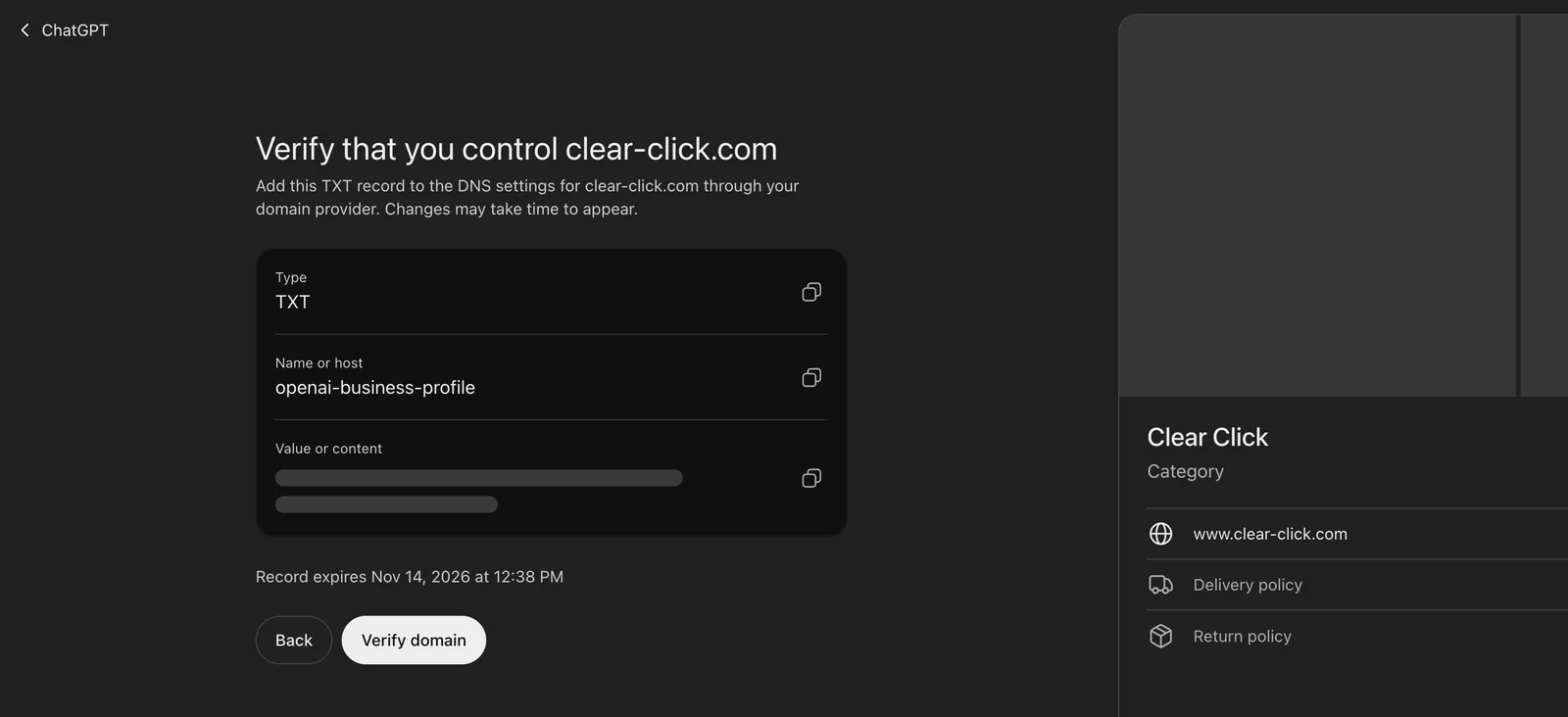
Depending on your business, you may be offered other routes instead, such as a code sent to a business email or phone number, or connecting a Shopify store. Pick whichever Business Hub offers you.
5. Choose a category and describe your business
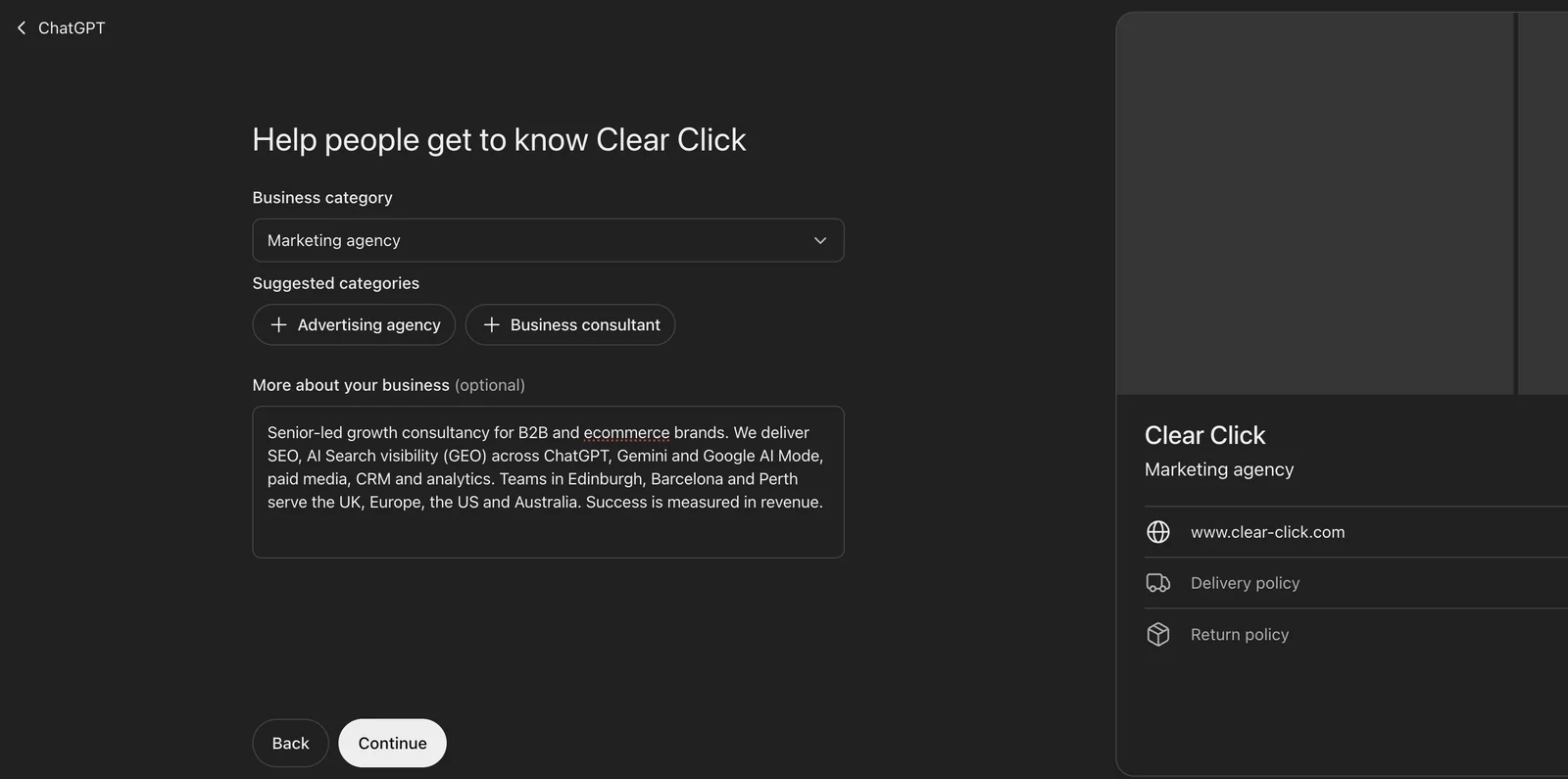
Pick the category that best matches what you sell. ChatGPT suggests related categories as you go; for us it offered Advertising agency and Business consultant alongside Marketing agency. The description is optional, but write one. OpenAI says ChatGPT can share it in conversations where it is helpful or relevant.
Keep it factual and specific: what you do, who for, where, and how you measure success. Avoid superlatives. A description that reads like an advert is less useful to a model trying to answer a question accurately.
6. Add contact details and answer the policy questions
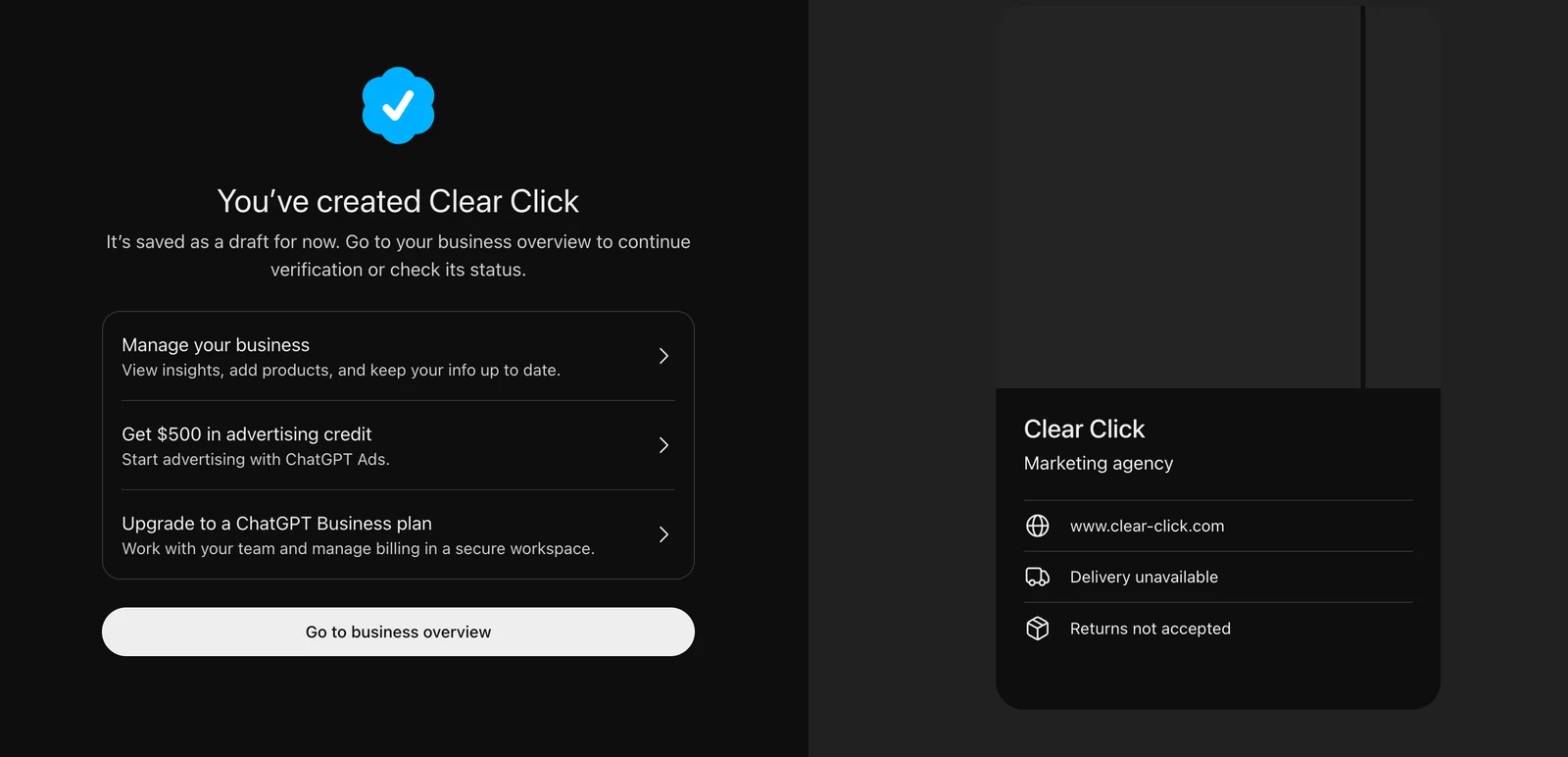
Contact details are optional. You will then be asked about delivery and return policies, which feels odd for a service business. Search Engine Journal hit the same question as a publisher. If you do not ship physical products, choose the options that say so. Our profile now reads Delivery unavailable and Returns not accepted, which is accurate for an agency.
7. Review the draft
Once submitted, your profile is saved as a draft. The confirmation screen also offers $500 in advertising credit for ChatGPT Ads and an upgrade to a ChatGPT Business plan. You do not need either. OpenAI is clear that you can manage a profile without running ads or publishing an agent.
8. Verify your identity
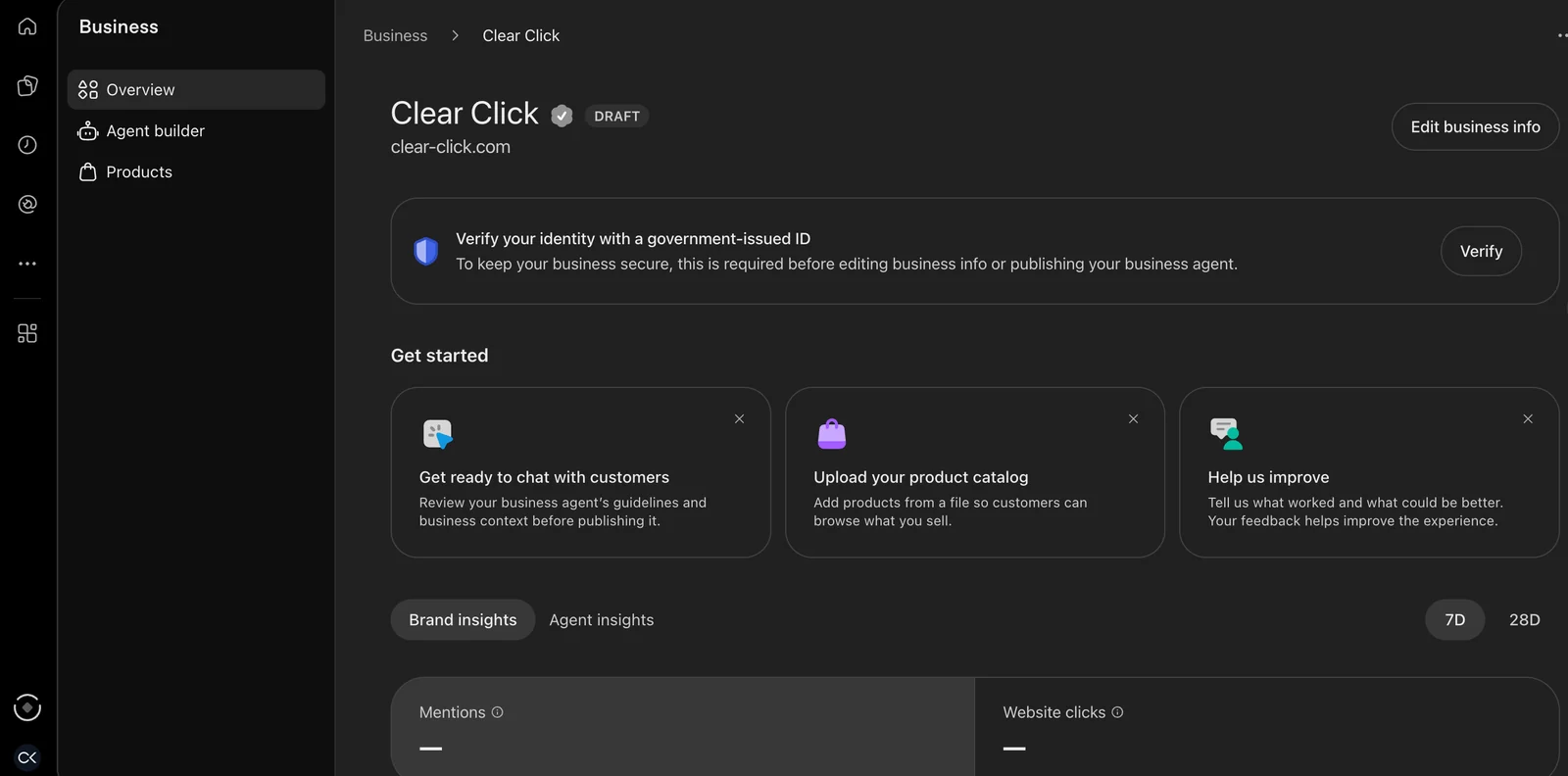
From the business overview you will be asked to verify your identity with a government-issued ID. This runs through Persona, OpenAI's verification provider, and usually continues on your phone through a QR code or link. You will also be asked for business details such as legal name, website and registered address. Make sure they match your Companies House record, because mismatches slow approval.
Editing your profile and seeing insights both depend on this step being approved. Until then, the overview shows a Draft label and the insight tiles stay empty, as ours did when we took this screenshot.
One thing to know before you press submit: OpenAI's FAQ says only drafts can be deleted, as Foundation's Business Hub walkthrough highlights. Once a profile is published, it stays. Check the name, category and description carefully first.
9. Invite your team or agency
Once approved, use Invite in the top right of the business overview to add colleagues or your agency. Each person signs in with their own ChatGPT account. If you manage several brands, repeat the process for each one.
What Business Hub insights show, and what they don't
Insights sit under a Brand insights tab, with 7-day and 28-day views. OpenAI's definitions matter more than usual here, because they are not the definitions you are used to from Google.
| Metric | What it counts | Watch out for |
|---|---|---|
| Mentions | For an online business, each time ChatGPT references your website in an answer | Your brand name alone does not count. A mention is closer to a citation than to a brand mention. |
| Profile views | People who open your business profile in ChatGPT | Useful as a trend, not on its own. |
| Website clicks | Recorded clicks on links to your website in ChatGPT | The tooltip itself says clicks do not confirm website visits or conversions. |
| Discovery topics | Common themes across conversations where your website is cited | Themes, not prompts. You never see what an individual person asked. |
Two caveats apply to all four. Insights are aggregated and only appear once activity passes a privacy threshold, so a smaller site may see dashes for a while, and a blank does not necessarily mean zero. And no conversations are shared with you, including chats with your own business agent.
For a sense of scale, Search Engine Journal reported its own figures: 353,356 mentions and 2,663 website clicks over 28 days. That is a large publisher, so the absolute numbers will not transfer to most businesses. The ratio is the useful part. Fewer than one in a hundred references to its site led to a recorded click. Being cited and being visited are now two different outcomes, and you need to track both.
What to do with the data
A dashboard is only worth claiming if it changes what you do. These are the ways we are building Business Hub into our own reporting and into the work we do for clients.
Reconcile clicks with your own analytics
ChatGPT adds utm_source=chatgpt.com to links it sends, so referral sessions are already visible in GA4. Compare Business Hub's website clicks against those sessions for the same 28 days. The two will never match exactly, because a recorded click is not a confirmed visit, but a large gap is worth investigating. Then follow those sessions through to enquiries and revenue. That is the number that justifies the work.
Treat discovery topics as a content brief
Discovery topics tell you which themes ChatGPT already associates with your site. Map each one to the page that should be answering it. Where a topic has a strong page, protect and improve it. Where a topic has no clear page, that is a gap. Where you expected a topic to appear and it doesn't, that is a bigger gap, because a competitor is likely being cited instead.
The pages that earn citations tend to answer directly near the top and carry specific detail a model cannot invent. We set out what that looks like in our guide to earning citations in AI answers, and the same principles apply in ChatGPT.
Fix the facts everywhere, not only in Business Hub
OpenAI's profile policy says profile information can come from other sources too, so Business Hub is one input among several. Use the claim as a prompt to audit how your business is described across your own About page, Companies House, Google Business Profile, LinkedIn and the directories in your sector. Consistent names, addresses and service descriptions make it easier for any AI system to describe you correctly.
Add mentions and clicks to monthly reporting
Report mentions and website clicks alongside Search Console and GA4, and note the platform's definition beside each figure. Keep a dated log of anything that might move them, such as site changes, content launches and algorithm updates. Google's November core update, which began on 10 November, the same day Business Hub launched, is a good example of why. Without a log, you will not know which change explains which movement.
Use it to judge GEO work properly
Until now, measuring generative engine optimisation meant running fixed prompt sets and tracking referrals. Those methods still matter, because Business Hub only covers ChatGPT and only counts references to your website. But for the first time there is a platform-side number to sit beside them, and that makes it much easier to see whether content and authority work is changing how often you are cited.
Where paid fits
Business Hub is an organic product, but it sits next to OpenAI's advertising business, and the link is deliberate. The $500 ad credit on the confirmation screen makes that plain.
ChatGPT Ads have been live in the UK since June 2026, and OpenAI has since opened its self-serve Ads Manager beta to UK advertisers. In the US, a business can already sponsor its Business Agent and use it as the destination for an ad. OpenAI says sponsored placements are labelled and do not influence ChatGPT's own answers.
The useful connection for UK advertisers is the data. Discovery topics show you the themes where you already earn organic citations. Those are natural candidates for testing paid placements, either to reinforce topics where you are strong or to cover topics where you should appear and don't. Used that way, organic insight becomes the brief for paid tests rather than the two running separately. If you sell through Shopify, our earlier piece on running a first ChatGPT Ads test as a UK merchant covers the measurement set-up we would put in place first.
My view: why OpenAI is building this
I think Business Hub is one of the more important things OpenAI has shipped for marketers, and not mainly because of the dashboard.
Google built its position in search on two quiet trades. Search Console gave site owners data in return for their attention and their sitemaps. Google Business Profile gave local businesses control of their listing in return for structured, verified facts. Both made Google the place where businesses managed their search presence, and both fed the ads business that paid for everything else.
Business Hub makes the same two trades at once. Businesses supply clean, verified information that OpenAI no longer has to piece together from across the web. In return they get the first data from ChatGPT itself on how it represents them. And the moment they finish setting up, they are offered ad credit and a route to sponsored agents. That is a platform building the organic and paid layers of a search ecosystem together, from day one.
It also changes who defines success. Mentions, clicks and discovery topics are counted on OpenAI's terms, and they will become the numbers people report upwards. That is useful, but it is worth holding some independence. Keep your own analytics as the source of truth for revenue, keep testing prompts yourself, and treat the platform's numbers as its account of events rather than the final word.
My advice is simple. Claim your profile now, while competitors are still reading the announcement. Build the data into your reporting from the first month, so you have a baseline before the reporting thresholds and definitions change. And plan for AI search as a channel with its own organic and paid sides, because that is clearly how OpenAI is building it.
Questions we get asked
Is ChatGPT Business Hub free?
Yes. Claiming and managing a profile is free, and you do not need to run ads or publish a business agent. Advertising is a separate, paid product.
Will claiming my business make ChatGPT recommend us more?
No. OpenAI says claiming does not guarantee higher placement and that ChatGPT still makes its own recommendations and comparisons. It gives you control of your information and visibility of the data. Earning more citations still depends on your content, authority and how clearly your business is described across the web.
Can a UK shop or restaurant claim its listing?
Not yet. At launch, claiming an existing local listing is limited to the US. UK businesses with a website can claim through the website route now.
Why are our insight numbers blank?
Either your claim and identity check are still being reviewed, or your activity has not yet passed OpenAI's reporting threshold. A blank does not always mean zero. Check back after approval, and use GA4 referrals from chatgpt.com in the meantime.
Can our agency manage the profile for us?
Yes. Once approved, the account holder can invite others from the business overview. Each person uses their own ChatGPT account.
Can we delete the profile later?
Only while it is a draft. Once published, a profile cannot be deleted, so check your details before final submission.
Get set up, then put the data to work
Claiming takes an afternoon. Getting value from it means connecting the insights to your content plan, your reporting and, where it makes sense, your paid testing. That is the work our AI search optimisation service is built around, and we are now setting up Business Hub for our SEO clients as part of it.
If you would like help claiming your profile or a second view on how visible your business is in ChatGPT today, get in touch and we will take a look.


